
May 2, 2026
125 readsLoad Chart Feature
New Feature: Real-Time Lift Capacity Calculator Now Live
Planning a safe, efficient lift is the most critical part of any job. To help you plan with confidence before you even set foot on the site, we are excited to announce a powerful new tool now available across albertacraneservice.com: the Real-Time Lift Capacity Calculator.
Directly embedded on our public crane listing pages, this interactive widget uses a crane’s actual, extracted load chart data to instantly tell you whether a planned lift is safe, warning you of potential overages before the crane is dispatched.
Here is a look at what the new calculator can do for your lift planning process.
Precision Inputs for Accurate Planning
We’ve designed the calculator to be highly customizable, adapting to the specific rigging and configuration needs of your lift.
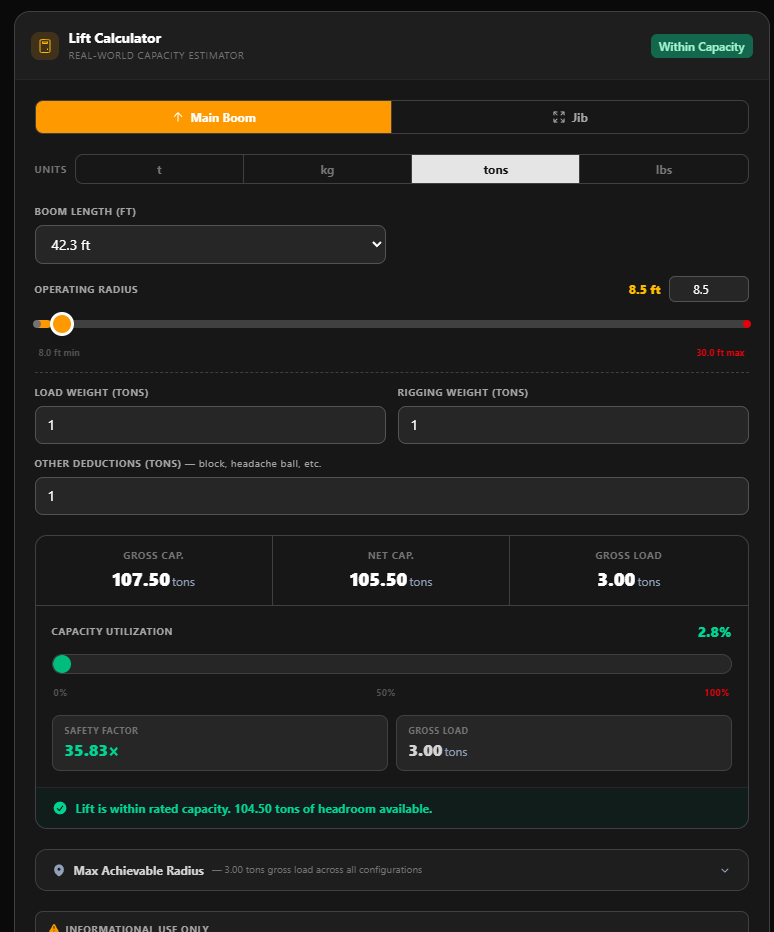
Dynamic Boom & Jib Settings: Select your boom length from a dropdown populated by the crane's exact load chart rows. If the crane has jib data, easily toggle between main boom and jib modes to factor in jib length and offsets.
Operating Radius: Dial in your exact radius using a slider or precision input. The calculator automatically constrains your input to the chart's minimum and maximum limits for your selected boom.
Comprehensive Weight Deductions: Enter your load weight alongside all necessary deductions (rigging, block, headache ball, etc.).
Live Unit Conversions: Work the way you want to work. Seamlessly toggle between tons, metric tonnes, pounds, and kilograms. The widget detects the crane chart's native unit system by default but will instantly convert your entered weights to your preferred display unit.
Instant, Visual Results
Once your data is entered, the calculator queries the crane's database and interpolates between the bracketing radius points to give you an exact, customized capacity.
You get immediate, easy-to-read feedback:
Side-by-Side Metrics: View your Gross Capacity, Net Capacity, and Gross Load at a glance.
Utilization Progress Bar: A color-coded visual indicator lets you know where you stand. It displays green for safe lifts (under 90%), amber for warnings (90–100%), and red if you are over capacity.
Status Banner & Safety Factor: A clear banner tells you exactly how much headroom you have left (or your overage amount), alongside a dedicated Safety Factor chip.
Find Your Max Achievable Radius
One of the most powerful features of the new calculator is the Max Achievable Radius Table. Based on your entered gross load, the widget calculates the furthest possible reach across every boom and jib configuration available in that crane's chart. This allows an operator to instantly see which setup will get them the furthest reach for their specific load.
How It Works Under the Hood
The calculator is powered by our smart PDF parsing system, which extracts highly accurate data directly from manufacturer load charts. If a specific crane does not yet have extracted data in our system, the widget will simply display a "No load chart data available" placeholder until it is updated.
Disclaimer: The Real-Time Lift Capacity Calculator is provided for informational use only. The results generated are estimates designed to assist with preliminary planning and do not constitute a certified lift plan. Always consult the crane's official manufacturer load chart and manual prior to operation.
Head over to our crane listings to test out the new calculator today!
Comments
No comments yet. Be the first!
Leave a comment